Room Configuration
Every setting of a Planning Poker room: the deck, the estimation method, the question card, offline voting, owner change, the story-point field and defaults
Updated
A Planning Poker room is configured when it is first opened, and can be changed later by its owner with Change settings. Inside a refinement, the cog on an issue row opens the same dialog.
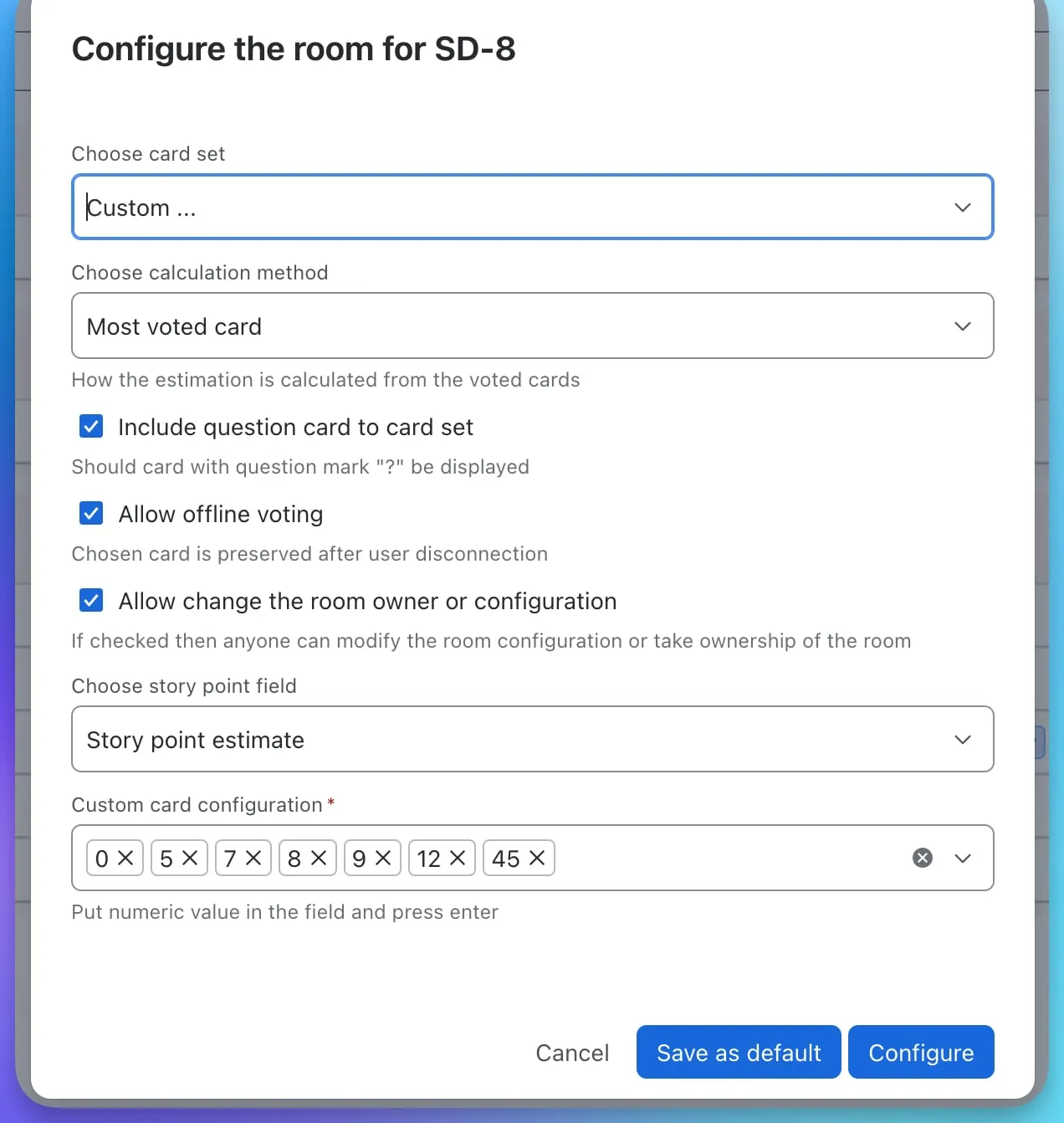
Settings
Card set
Choose Fibonacci (0, 1, 2, 3, 5, 8, 16, 20, 40), Powers of two (0, 1, 2, 4, 8, 16, 32, 64), T-shirt sizes (XXS to XXL) or Custom. For a custom deck, type each numeric value and press Enter; the cards appear as chips you can remove.
Calculation method
How the room turns the revealed cards into a proposed estimate: Most voted card, Average, Median or Highest voted card. The result always snaps to a card that exists in the deck. Estimating an issue explains each method.
Include question card
Adds a ? card to the deck. Picking it counts as an abstention and is left out of the calculation.
Allow offline voting
When switched on, a participant’s chosen card is kept while they are disconnected, so a dropped connection or a closed tab does not restart the round for them.
Allow change the room owner or configuration
When switched on, anyone in the room can change the configuration or take over ownership, for example when the original owner has left. When switched off, only the owner can change settings, reveal cards, set points or remove the room.
Story point field
The numeric Jira field that Set points writes to, usually Story point estimate or Story Points. Only numeric fields available on the project appear in the list. If the field you expect is missing, check that it is on the issue type’s screen in the Jira project settings.
Buttons
- Configure (or Update room) saves the settings for this room.
- Save as default stores the settings as your personal default for this project and issue type. The next room you open for a matching issue is preconfigured with them.
- Remove room, in the room itself, deletes the room and its votes. The Jira issue is not affected.
Access
There are no passwords, invitations or private rooms. Anyone who can see the Jira issue can open its room; Jira’s own permissions are the access control.