Agile Toolbox for Jira
Retrospectives for Jira
Agile Toolbox adds retrospective boards directly to Jira Cloud. Every board keeps its own retro history. The team adds cards, reacts, votes within a budget and groups duplicates in real time — and turns any card into a Jira issue on the spot, so the actions land in the backlog instead of a document nobody reopens.
Free forever for up to 10 users
- Works with Jira Cloud
- Built on Atlassian Forge
- Free forever for up to 10 users
- EU and US data regions
How a retrospective works
- 1Create the retrospective for your Jira board, from one of nine column templates or your own columns, and set the vote budget.
- 2The team adds cards, hidden until you reveal them. Everything appears live, so nobody waits their turn.
- 3Reveal the cards, group duplicates by dropping one onto another, and react with emoji while you read.
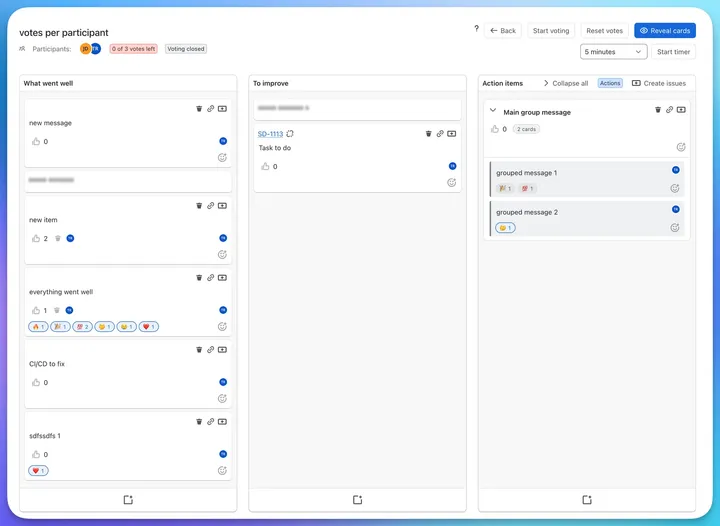
- 4Open voting. Everyone spends their votes, and the board shows who still has some left.
- 5Discuss the top-voted items, then create a Jira issue for every card in the action column and archive the board for next time.
Prepare the board before the meeting
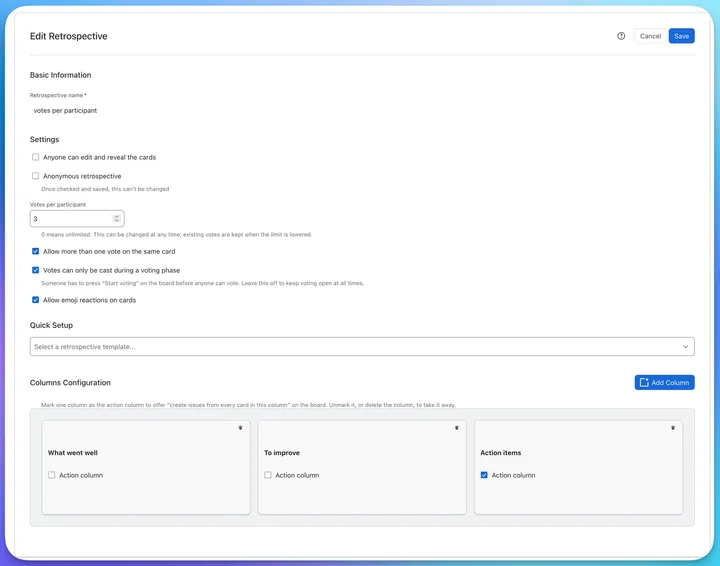
- Start from one of nine column templates, or define your own columns
- Give everyone a vote budget, and decide whether several votes can land on one card
- Open voting only when the facilitator says so, or leave it open all the time
- Make the board anonymous, switch emoji reactions on or off, and mark one column as the action column
Run the retro with the whole team at once
- Cards appear for everyone the moment they are added
- Keep cards hidden while people write, then reveal them together
- Vote within the budget; the board shows "2 of 3 votes left" so nobody has to count
- React with emoji to say "exactly this" or "not sure" without spending a vote
- Run each phase against a timer with presets from one minute up
Group duplicates without losing anything
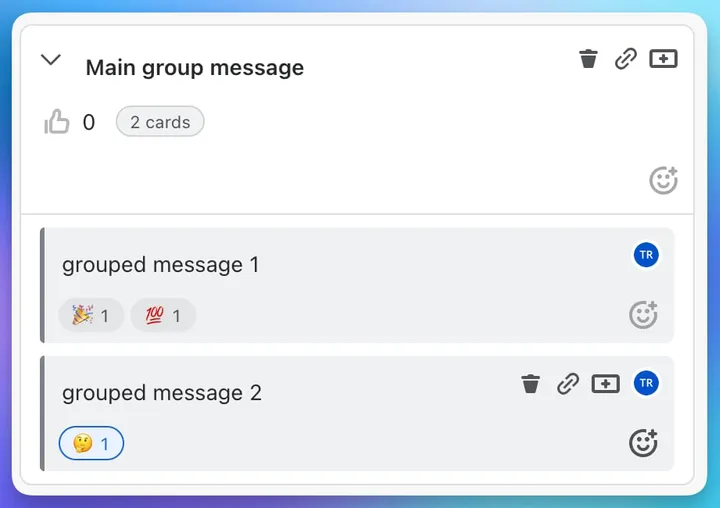
- Drop a card onto another to group them; both cards stay intact
- The group gets its own title, votes and reactions
- Fold a group to keep the column short, or collapse them all at once
- Drag a group as a single block, or drag a card back out
Turn actions into backlog items
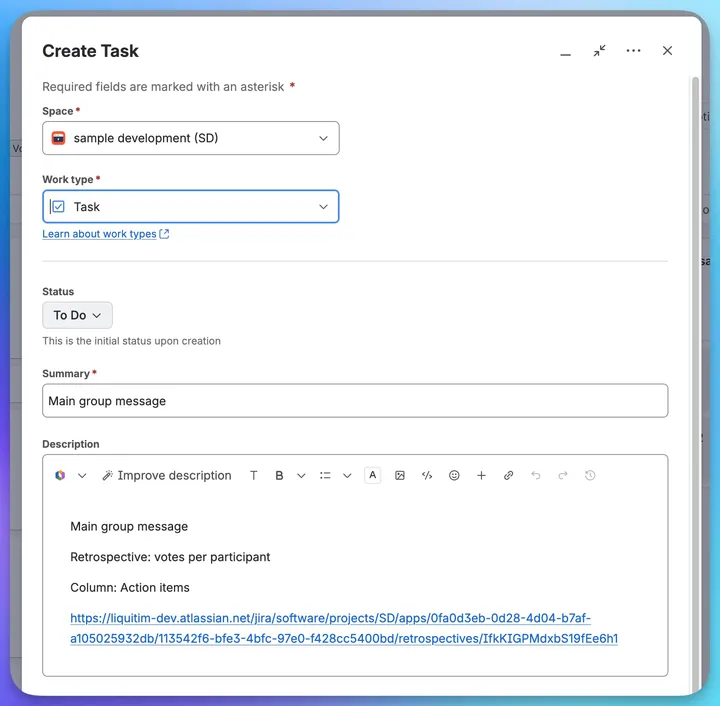
- Create a Jira issue from any card; the summary and description are prefilled and link back to the board
- Mark a column as the action column and create issues for every card in it in one pass
- Link an existing issue to a card, or several, and open them from the board
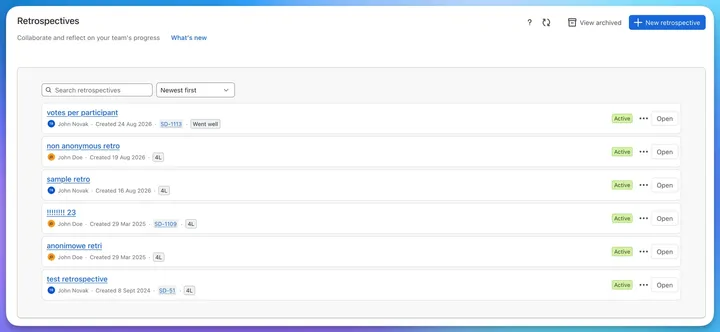
Keep the history per board
- Search and sort every retrospective the board has run
- See the template, the owner, the linked Jira issues and the status at a glance
- Archive finished retros so past actions stay reviewable, read-only
Retrospective formats
Pick a template when you create the retrospective, then add, rename or reorder columns as you like. One column can be marked as the action column.
| Format | When to use it |
|---|---|
| Went well / To improve / Action items | The default. Fast, and works for almost any team. |
| Start, Stop, Continue | When the team needs to decide on concrete behaviour changes. |
| Mad, Sad, Glad | When morale matters more than process this sprint. |
| 4L — Liked, Learned, Lacked, Longed for | Good after a big release or a difficult project. |
| Sail trip | Wind, anchors, rocks and the island: a visual metaphor for what pushes the team and what holds it back. |
| Starfish | Keep, more of, less of, start, stop. Finer-grained than Start, Stop, Continue. |
| KALM | Keep, Add, Less, More. A quick format for a team that already knows its habits. |
| Thumbs | Thumbs up, thumbs down. The lightest format there is. |
| What went… | What went well and what went wrong, nothing else. |
| Custom columns | Anything else. Add, rename and reorder your own columns. |
Frequently asked questions
- What is a sprint retrospective?
- A sprint retrospective is a recurring meeting where a team reviews how the last sprint went and decides what to change in the next one. It is the ceremony that makes an agile process improve over time, rather than simply repeat. Scrum places it at the end of every sprint, after the sprint review.
- Can you run retrospectives inside Jira?
- Yes. Agile Toolbox for Jira adds retrospective boards to Jira Cloud. Each Jira board keeps its own retrospectives, the team adds cards, reacts and votes in real time, and any card can be turned into a Jira issue directly from the board — so action items land in the backlog instead of being lost in a document.
- Is Agile Toolbox free?
- Agile Toolbox is free forever for teams of up to 10 users. Larger teams are billed through the Atlassian Marketplace, which handles all licensing and payment.
- Does it work for remote and hybrid teams?
- Yes. Cards, votes, reactions and edits appear for everyone the moment they are made. The board stays open between meetings, so people in different time zones can add cards when they are online and the team votes together when it meets.
- What happens to the action items?
- Any card on the board can be converted into a Jira issue without leaving the retrospective, with the summary and description prefilled and a link back to the board. Mark one column as the action column and the board creates an issue for every card in it, one after another.
- How does voting work?
- Each participant gets a vote budget you set per board, for example three votes. The board shows how many votes each person has left. You can allow several votes on one card or one vote per card, and you can restrict voting to a phase the facilitator opens with "Start voting". Emoji reactions are separate and never count as votes.
- Can the retrospective be anonymous?
- Yes. An anonymous board hides who wrote each card, who voted and who reacted; only the counts are shown. Once a board is saved as anonymous it cannot be switched back, so nobody can be identified after the fact.
- Can we look back at previous retrospectives?
- Yes. Finished retrospectives are archived per board and open read-only with their cards, votes, reactions and linked issues, so the team can review what it committed to last time before deciding what to change next.
- Which retrospective formats are supported?
- Nine column templates cover the common formats — Went well, Start Stop Continue, 4L, Sail trip, Mad Sad Glad, Thumbs, What went…, Starfish and KALM — and you can define custom columns for any other format your team prefers.
Retrospective guides
- How to Run Retrospectives Inside Jira: Complete Guide (2026)
Run agile retrospective meetings directly in Jira with native retro boards. Guide covers templates, facilitation tips, and action item tracking for Scrum teams.
- How to Facilitate Remote Retrospectives in Jira: A Step-by-Step Guide
Learn how to run effective remote retrospectives directly in Jira. A step-by-step guide using Agile Toolbox to boost engagement and execution.
- Mastering Retrospectives: Turning Reflection into Action
Transform your team's retrospectives from routine meetings into powerful catalysts for continuous improvement and team growth.
Free forever for up to 10 users
Retrospectives, inside Jira
Run your next retro inside Jira
Free forever for up to 10 users. Install from the Atlassian Marketplace and open a board from your Jira project.