Agile Toolbox for Jira
Planning Poker for Jira
Agile Toolbox adds Planning Poker rooms directly to Jira Cloud. Open a room from any Jira issue, or build a refinement session from a sprint, the backlog or a Kanban board. The team votes privately, reveals together, sees whether it agrees, and the estimate is written straight into your Jira story-point field — no separate accounts, no copying between tools.
Free forever for up to 10 users
- Works with Jira Cloud
- Built on Atlassian Forge
- Free forever for up to 10 users
- EU and US data regions
How a session works
- 1Build a refinement from a sprint, the backlog or a Kanban board — or pick "Start poker" on a single Jira issue.
- 2Open the Agile Toolbox page on the board. Anyone who can see the board can join; there is nothing to sign up for.
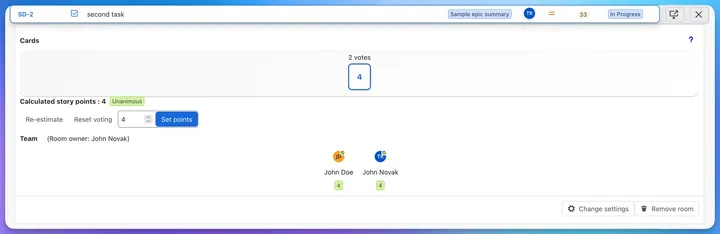
- 3Everyone picks a card privately, against a timer if you want one. Votes stay hidden until the owner reveals them.
- 4Cards reveal at once, so nobody anchors on the first number spoken. The room proposes a number — most voted, average, median or highest — and labels the round Unanimous, Close or Split.
- 5Discuss the outliers, re-vote if needed, then save the agreed estimate to Jira in one click.
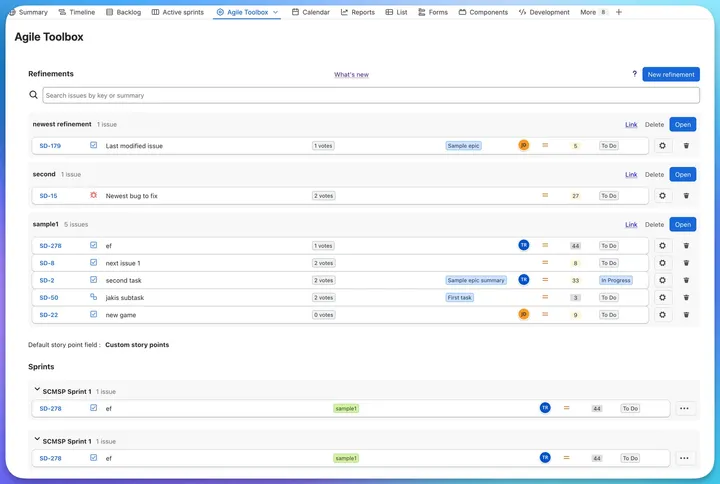
Build a refinement from your backlog, sprints or Kanban board
- Every Scrum or Kanban board keeps its own refinements
- Add issues from the backlog, from any sprint, or from a Kanban column
- Search everything by key or summary, and drag issues between refinements
- Each row shows live vote counts, the epic, the status and the current estimate
Vote, reveal, and agree on a number
- Expand any issue in the refinement and vote right there
- Cards reveal at once, so nobody anchors on the first number spoken
- Pick how the estimate is calculated: most voted card, average, median or highest
- A Unanimous, Close or Split label shows how far apart the team is
- Adjust the number if you like, then save it to your Jira story-point field in one click
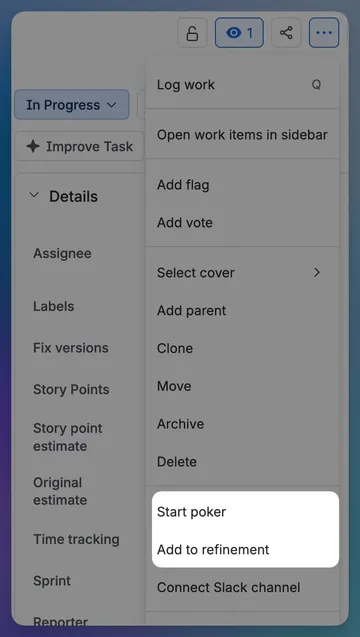
Estimate a single issue from the issue view
- "Start poker" in the issue actions menu opens a room for that issue, with nothing to prepare
- "Add to refinement" drops the issue into an existing or new refinement on any board
- Anyone who opens the issue joins the same room in real time
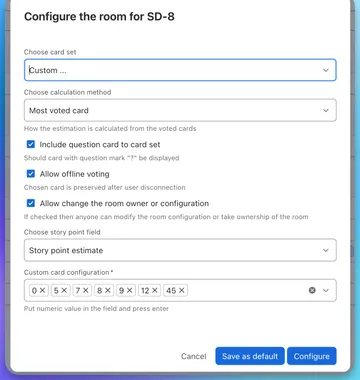
Configure the deck once, reuse it everywhere
- Fibonacci, powers of two, T-shirt sizes, or any numeric set you type in
- Add a "?" card for people who need more information; it never skews the result
- Map the estimate to whichever numeric Jira field your project uses
- Save the configuration as your default per project and issue type
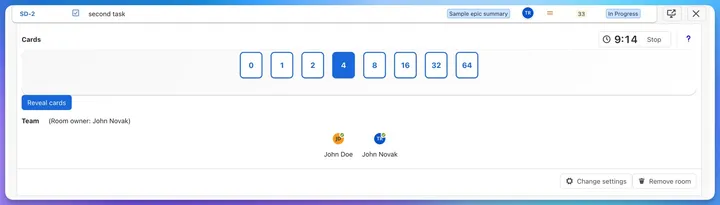
Keep the round moving
- Start a round timer with one click; it turns amber in the last minute and says "Time's up"
- See who has voted without seeing what they picked
- Reset the vote or re-estimate later without losing the room
Supported card sets
| Card set | When to use it |
|---|---|
| Fibonacci | 0, 1, 2, 3, 5, 8, 16, 20, 40 — the default for story points |
| Powers of two | 0, 1, 2, 4, 8, 16, 32, 64 — coarser buckets for larger work |
| T-shirt sizes | XXS to XXL — for teams estimating relative size without numbers |
| Custom | Any numeric values you type in, in any order |
| Question card | An optional "?" for anyone who needs more information; it counts as an abstention, not a number |
In Jira vs. a standalone Planning Poker tool
| Agile Toolbox (in Jira) | Standalone web tool | |
|---|---|---|
| Runs inside Jira | Yes — a project page and two issue actions | No — a separate web app |
| Accounts needed | None. Every Jira user already has access | A separate account per participant |
| Issue data | Read live from Jira | Copied, pasted or imported |
| Saving the estimate | Written straight to your Jira story-point field | Copied back by hand |
| Estimation method | Most voted, average, median or highest, per room | Usually the average only |
| Round timer | Yes, with presets and a "Time's up" state | Varies |
| Retrospectives | Included in the same app | A different tool again |
Frequently asked questions
- What is Planning Poker?
- Planning Poker is a consensus estimation technique for agile teams. Each person privately picks a card representing the effort a user story will take, and everyone reveals at the same time. Revealing together prevents anchoring — nobody adjusts their estimate to match the first number said out loud. Where estimates differ widely, the team discusses and votes again.
- Can you run Planning Poker inside Jira?
- Yes. Agile Toolbox for Jira adds Planning Poker rooms directly to Jira Cloud. You can open a room from any Jira issue for a quick estimate, or build a full refinement session from a sprint, the backlog or a Kanban board. Votes happen in real time and the agreed estimate is written straight back to the Jira field you configure.
- Is Agile Toolbox free?
- Agile Toolbox is free forever for teams of up to 10 users. Larger teams are billed through the Atlassian Marketplace, which handles all licensing and payment.
- Do team members need separate accounts?
- No. Anyone who can already see the Jira board can join a Planning Poker room. There are no separate logins, invitations or seat management to administer.
- Which card sets are supported?
- Fibonacci, powers of two, T-shirt sizes, and any custom numeric set you define, with an optional "?" card. The card set is configured per room, so different teams on different boards can use different scales.
- How is the final estimate calculated?
- You choose per room: the most voted card, the average, the median, or the highest card. The result always snaps to a real card from the deck, and a Unanimous, Close or Split label tells you at a glance whether the team needs to talk before saving.
- What if someone drops off during a session?
- With "Allow offline voting" switched on, a participant's chosen card is kept while they are disconnected, so the round does not have to restart when they come back. Sessions are live, so the team votes together rather than days apart.
- Does it work with Kanban boards?
- Yes. Refinements work on Scrum and Kanban boards. On a Kanban board the issues in the first column are the backlog you build refinements from.
- Where is the estimate saved?
- Into the Jira issue field you choose during room configuration — usually Story Points. The value is written by the app, so there is no copying between tools.
Planning Poker guides
- Planning Poker in Jira: The Complete Guide for Scrum Teams (2026)
Learn how to run Planning Poker estimation sessions directly inside Jira. Complete guide covering setup, card sets, estimation methods, distributed teams and best practices for Scrum teams.
- Synchronous vs. Asynchronous Planning Poker in Jira: Which is Right for Your Team?
Explore the differences between synchronous and asynchronous Planning Poker in Jira. Learn which method fits your team best and how to get the benefits of both with a live tool inside Jira.
- T-Shirt Sizing vs. Story Points: Which is Right for Your Team?
Compare T-Shirt Sizing and Story Points for Agile estimation. Understand the pros and cons of each and how to implement them in Jira.
- Planning Poker Online: Digital Estimation for Remote Teams
Discover how to conduct effective planning poker sessions online for remote and distributed Agile teams using digital tools.
Free forever for up to 10 users
Planning Poker, inside Jira
Start estimating in Jira today
Free forever for up to 10 users. Install from the Atlassian Marketplace and pick "Start poker" on any Jira issue.